BlueDriver OBD2 Scan Tool
Lemur Vehicle MonitorsAuto & Vehicles
3.57.07K Reviews
- Version
- 8.12.2
- Installs
- 1.00M
- Age Rating
- Everyone
Screenshots
Our Review of BlueDriver OBD2 Scan Tool
 Analysis by Appyee
If you are trying to understand what is happening inside a car without immediately paying for a workshop inspection, BlueDriver OBD2 Scan Tool is one of the more approachable options I have used in the Auto & Vehicles category. It is a free app from Lemur Vehicle Monitors, but it is designed to work as part of a BlueDriver diagnostic setup rather than as a complete solution on its own. That distinction matters before you install it.
My overall impression is that the app is most useful for turning confusing dashboard warnings into information you can act on. It is not a magic repair tool, and it cannot make a mechanical problem disappear. What it can do is give you a clearer starting point: read diagnostic information, help you understand a fault, and make a conversation with a mechanic less one-sided. For a careful car owner, that can be genuinely valuable.
What using BlueDriver feels like in everyday driving
The first thing I noticed is that the app makes more sense when I treat it as a diagnostic companion, not as a casual dashboard accessory. You need the compatible BlueDriver hardware connected to the vehicle, and your phone becomes the screen and control point. Without that physical connection, installing the app alone does not turn a phone into an OBD2 scanner.
That setup also explains why the experience can feel different from ordinary automotive apps. This is not an app I open for entertainment or daily tracking. I reach for it when a warning light appears, when I am checking a used car, or when a vehicle behaves strangely and I want more information before deciding what to do next.
In a realistic situation, imagine the check-engine light appearing on the way home. I would not use the app while driving. I would park safely, connect the scanner, open the app, and read the diagnostic information with the engine in the appropriate state. The useful part is not simply seeing a code; it is having a better basis for deciding whether the car needs immediate attention, whether I can arrange a workshop visit, or whether I should investigate a recurring issue more carefully.
The most important practical lesson is to use the app for diagnosis and decision-making, not as permission to ignore a warning. A code can point toward a system or condition, but interpreting it still requires judgment. A vehicle that is overheating, losing power, making unusual noises, or showing serious warning indicators should be treated as a mechanical safety issue first and an app problem second.
Speed expectations: quick enough for the job, not instant magic
Perceived speed depends on several steps outside the app itself. The phone must communicate with the scanner, the scanner must communicate with the vehicle, and the vehicle must provide the requested information. Because of that chain, I would not judge the experience like a social app that should open and refresh instantly.
For a basic check, the process feels naturally task-focused. I connect everything, wait for the vehicle and phone to recognize the setup, then move through the available diagnostic information. The app is at its best when I already know why I opened it. A focused scan feels more efficient than repeatedly browsing screens without a clear question.
There is also a useful difference between reading information and acting on it. Reading a fault is generally a short diagnostic step, while understanding whether the fault is current, intermittent, or related to another issue takes more time. The app can speed up access to information, but it cannot speed up the reasoning required to avoid a wrong repair.
If you are comparing it with a cheap generic scanner, the advantage is less about raw speed and more about the quality of the interpretation and the convenience of having the phone as the interface. A basic reader may show a code quickly, but leave you searching elsewhere for context. BlueDriver is more appealing when you value a guided experience over the absolute minimum number of seconds.
Heavy-use moments: where the workflow becomes demanding
The app is not especially demanding in the way a game or video editor might be, but diagnostic sessions can still become busy. The pressure comes from the vehicle, the connection, and the amount of information you are trying to understand at once. If a warning light has appeared just before a trip, even a straightforward scan can feel more complicated because you are making a decision under stress.
I find the workflow easier when I prepare before connecting. I park somewhere safe, keep the phone charged, make sure the vehicle is in the correct condition for the test, and note what the car was doing before the warning appeared. That small habit improves the value of the results more than simply opening the app quickly.
A second heavy-use moment is checking a used vehicle. In that situation, I would not rely on one scan as a complete inspection. I would use the app as one layer of evidence alongside a visual check, a road test, service records, and, ideally, an independent mechanic. A clean-looking scan is helpful, but it should not override obvious mechanical wear or a seller who refuses a proper inspection.
Another demanding scenario is an intermittent problem. If the car behaves normally when you scan it, the result may not explain what happened earlier. That is where keeping notes becomes useful: record the symptoms, driving conditions, dashboard messages, and timing, then compare them with later scans. The app can be part of that process, but the owner still has to build the timeline.
Reliability: useful information still needs a sensible backup plan
In my experience, reliability here should be judged in two ways. The first is whether the app and scanner establish a dependable connection. The second is whether the information leads to a sensible next step. Even when the connection works perfectly, a diagnostic result can be misunderstood if it is treated as a final verdict rather than a clue.
Connection problems are not always caused by the app. The vehicle may not have power at the diagnostic port, the scanner may not be seated correctly, the phone connection may need attention, or the car may not support every type of information you expect. When something fails, I would check the physical setup before assuming the software is broken.
Recovery is another area where preparation helps. If a scan is interrupted, I would stop, return the vehicle and phone to a stable state, and reconnect rather than repeatedly tapping through screens. I would also avoid clearing a fault simply to make the dashboard look normal. Erasing information before recording it can remove useful evidence for a later diagnosis.
The app has a strong role as a first look and a communication aid. I can imagine using the displayed information to explain a concern to a mechanic more clearly, especially when the warning is intermittent. However, I would not use it to replace professional testing for braking, steering, suspension, airbag systems, or any problem that could affect safe control of the vehicle.
The public response is mixed but substantial: the app holds an average rating of 3.5 from around 17 thousand ratings, with roughly 7 thousand written reviews. More than a million installs show that it has reached a broad audience, but popularity should not be confused with universal compatibility or a guarantee that every diagnostic session will be smooth.
Device constraints and compatibility decisions
BlueDriver is available free of charge and is rated for Everyone, which makes the app easy to consider before committing to a diagnostic routine. It supports devices running Android 8.0 or later, so older phones may be excluded even if they still work well for other tasks. The current version is 8.12, and keeping the app updated is sensible when using a phone as part of a vehicle connection.
The bigger constraint is not simply the phone. It is the relationship between the specific vehicle, the OBD2 hardware, and the diagnostic information available through that combination. I would check compatibility before buying or relying on the setup for a particular car. A free app can still involve a separate hardware decision, and that is the part that determines whether the whole system is useful to you.
This also affects who should skip it. If you only want to monitor fuel economy, plan routes, or receive ordinary maintenance reminders, a simpler automotive app may be a better fit. If you expect professional workshop-level testing across every vehicle system, a consumer phone-based scanner may not meet your needs. The right audience is someone who wants more insight than a basic code reader offers but does not need a full garage diagnostic platform.
Phone resources are unlikely to be the main concern during a short scan, but I still would not begin an important diagnostic session with a nearly empty battery or a crowded, unstable wireless environment. The app is part of a chain, and small practical weaknesses can become frustrating when you are standing beside a car in bad weather or preparing for a long journey.
Three habits that make the scanner more useful
First, I would record the original result before taking any action. Save the code or write down the wording, note the symptoms, and photograph the dashboard if appropriate. This creates a reference point for a mechanic and lets you compare later results. Clearing a warning without preserving that context makes the next step harder.
Second, I would scan before and after a repair rather than only after the light disappears. A later scan can help confirm whether the condition remains, but it should not be treated as proof that a repair was performed correctly. The most useful comparison is between the original symptom, the work completed, and the vehicle’s behavior afterward.
Third, I would use the app to challenge assumptions, not to confirm them. If I suspect a bad sensor, I would avoid ordering that part immediately just because a related code appears. Several faults can produce similar symptoms, and replacing parts without testing can become more expensive than paying for a proper diagnosis in the first place.
There is also a fourth habit worth mentioning: use the app before a problem becomes urgent if you are evaluating a car you may buy. I would combine the scan with a cold start, a road test, an inspection underneath the vehicle, and a review of maintenance history. A diagnostic tool is strongest when it adds evidence to a broader process, not when it is asked to carry the entire decision.
How it compares with ordinary alternatives
The most obvious alternative is a simple handheld OBD2 reader. That option can be cheaper or more direct, especially for someone who only wants to retrieve a basic fault code occasionally. A handheld device may also feel less dependent on a phone. BlueDriver becomes more attractive when you prefer a larger familiar screen, software-guided information, and the ability to keep the diagnostic process in one mobile workflow.
Another alternative is a workshop visit. Professional equipment and experience remain the better choice for complicated faults, safety-related systems, repeated failures, or a vehicle that is undriveable. The app can help you arrive better informed, but it does not replace a technician’s physical inspection, test equipment, or repair expertise.
Generic Bluetooth scanners paired with separate apps offer flexibility and may appeal to technically confident users who enjoy comparing applications. The trade-off is that you may spend more time interpreting codes and checking whether the software supports the vehicle properly. BlueDriver is better suited to someone who wants a more unified experience and is willing to use the associated hardware.
I would also separate this tool from maintenance reminder apps. A reminder app tells you when to think about routine service; this kind of diagnostic tool helps investigate a vehicle symptom. They solve different problems, and choosing between them depends on whether your immediate concern is scheduled upkeep or an active warning.
Who will get the most value from it?
I would recommend it to owners who like understanding their cars, drivers who want more information before visiting a mechanic, and people considering a used vehicle who know how to combine a scan with other checks. It is particularly useful for someone who does not want to guess from a dashboard light but also does not need to perform advanced workshop procedures.
It can also suit a small household with several compatible vehicles, because the phone-based workflow is easier to carry than a bulky diagnostic setup. Still, I would verify each vehicle individually rather than assuming that one successful scan guarantees identical coverage elsewhere.
I would be more cautious recommending it to a person who expects a one-tap answer such as “replace this part now.” That is not how responsible diagnosis works. I would also steer away from it for anyone uncomfortable with connecting hardware, reading technical information, or accepting that a professional inspection may still be necessary.
My performance verdict after weighing the trade-offs
BlueDriver OBD2 Scan Tool feels most convincing as a practical information layer between a dashboard warning and a repair decision. Its speed is adequate for focused checks, its resource demands appear modest for this kind of task, and its recovery depends heavily on careful connection and sensible record-keeping. The experience is not frictionless, but much of that friction comes from the vehicle and the diagnostic process rather than from ordinary app use.
The free app from Lemur Vehicle Monitors is a reasonable starting point for Android users on version 8.0 or newer, provided they understand the need for compatible hardware and realistic expectations. Its Everyone rating makes it broadly approachable, while the large install base suggests that many drivers are willing to use this style of tool. The average rating also signals that the experience is not perfect for everyone, so I would treat compatibility and workflow as personal purchase considerations.
My recommendation is conditional but positive: choose it if you want clearer vehicle information, are prepared to learn what the results mean, and will use it alongside proper mechanical judgment. Skip it if you want routine reminders, a completely independent handheld reader, or professional-level diagnosis without a technician. Used carefully, BlueDriver can make car problems less mysterious; used carelessly, it can create false confidence. That difference comes down less to tapping the scan button and more to what you do with the information afterward.
Privacy and Permissions
See what permissions an app requests and how it handles your data.
- Location
- approximate location (network-based), precise location (GPS and network-based)
- Phone
- read phone status and identity
- Photos/Media/Files
- read the contents of your USB storage, modify or delete the contents of your USB storage
- Storage
- read the contents of your USB storage, modify or delete the contents of your USB storage
- Camera
- take pictures and videos
- Microphone
- record audio
- Wi-Fi connection information
- view Wi-Fi connections
- Device ID & call information
- read phone status and identity
- Other
- view network connections, pair with Bluetooth devices, access Bluetooth settings, full network access, run at startup, draw over other apps, control vibration, prevent device from sleeping, read Google service configuration
Verdict
Strengths of BlueDriver OBD2 Scan Tool
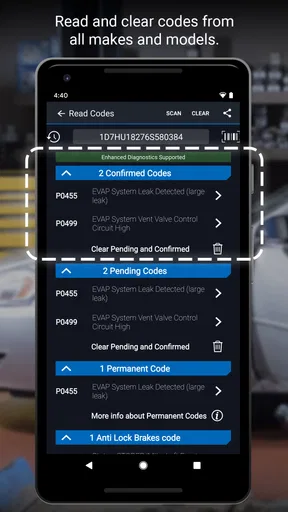
- Reads and clears many manufacturer-specific fault codes.
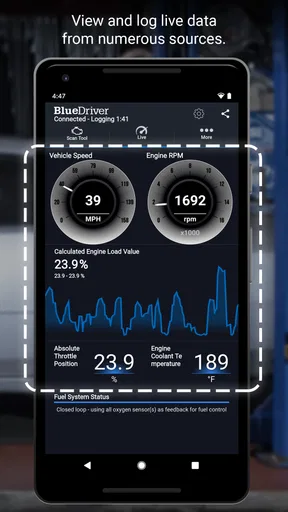
- Live data graphs make engine behavior easier to monitor.
- No subscription is required after purchasing the adapter.
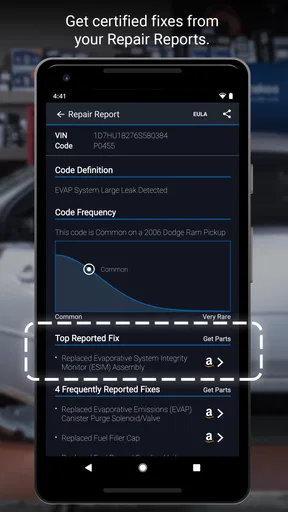
- Stores diagnostic reports for later review or sharing.
- Works with both Android and iOS devices.
Limitations of BlueDriver OBD2 Scan Tool
- Requires the separate BlueDriver hardware adapter to function.
- Advanced coding and ECU programming features are not included.
- Vehicle coverage can vary by make, model, and production year.
- Some readings may be difficult for beginners to interpret.
- Bluetooth connection issues can occur in areas with interference.
Similar Picks in This Category
View All
Android Auto
Google LLC4.1

maxim — order a taxi & food
PT. SITO4.7

Штрафы ГИБДД: проверка с фото
Pays LLC – Штрафы ГИБДД4.7

Номерограм – проверка авто
Авто Ассист4.8

Дром Авто
Дром4.9

Frequently Asked Questions
What is BlueDriver OBD2 Scan Tool and how does it work?
BlueDriver is a vehicle diagnostic system that combines a small Bluetooth OBD2 adapter with a mobile app for Android and iOS. After plugging the adapter into your car’s OBD2 port, the app connects to it wirelessly and reads available diagnostic information. It can scan for trouble codes, explain many results in plain language, display live data, and help users understand potential vehicle problems without immediately visiting a repair shop.
Which vehicles are compatible with BlueDriver?
BlueDriver is primarily designed for vehicles equipped with a standard OBD2 or EOBD port, which generally includes most cars and light trucks sold in the United States from model year 1996 onward. Compatibility with advanced manufacturer-specific functions can vary by make, model, year, and region. Before downloading or purchasing, users should check the official compatibility information, especially if they own a European, Asian, diesel, hybrid, or older vehicle.
What can BlueDriver diagnose and what are its limitations?
BlueDriver can read and clear many check-engine codes, show diagnostic reports, monitor selected live sensor data, and, on supported vehicles, access enhanced systems such as ABS, airbag, transmission, or body modules. However, it is not a complete replacement for professional diagnostic equipment. The available tests depend on the vehicle, and the app cannot repair mechanical faults, guarantee a diagnosis, or replace hands-on inspection by a qualified technician.
Is BlueDriver easy to use for beginners?
The app is relatively approachable for drivers who have never used a diagnostic scanner. The adapter plugs into the vehicle’s OBD2 socket, and the application provides guided instructions for pairing, scanning, and interpreting results. Reports and code descriptions are easier to understand than raw scanner data. Nevertheless, users should avoid clearing codes simply to turn off a warning light, because doing so may hide an unresolved safety or mechanical issue.
Does BlueDriver require a subscription or internet connection?
BlueDriver has traditionally been sold as a hardware-and-app solution rather than a basic monthly diagnostic subscription, but features, pricing, and account requirements can change with app updates and regional policies. An internet connection may be needed for downloading the app, updating vehicle databases, accessing explanations, or sharing reports, while some scanning functions may work after the adapter and app are properly set up. Check the current store listing before purchase.
